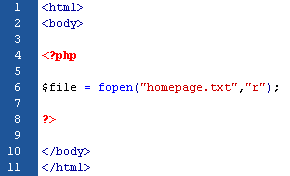
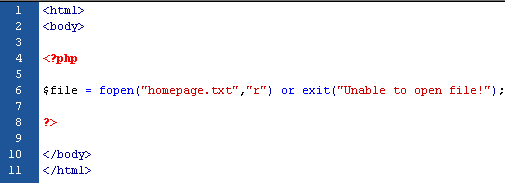
The example below shows a simple script that opens a text file:
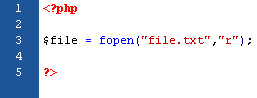
(click image to view)
If the "file.txt" file does not exist, you might get an error like this:

(click image to view)
To avoid that the user gets an error message like the above, we test if the file exist before we try to access it:
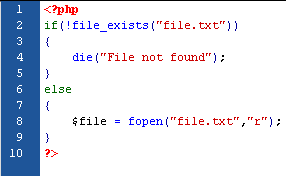
(click image to view)
Custom Error Handler
It is quite simple to create a custom error handler, just by creating a function that can be called when an error occurs, and the function must be able to handle at least 2 parameters (error level & error message). The function also can accept up to 5 parameters. Please look at the description below:
Syntax:


(click image to view)
Error Report Level
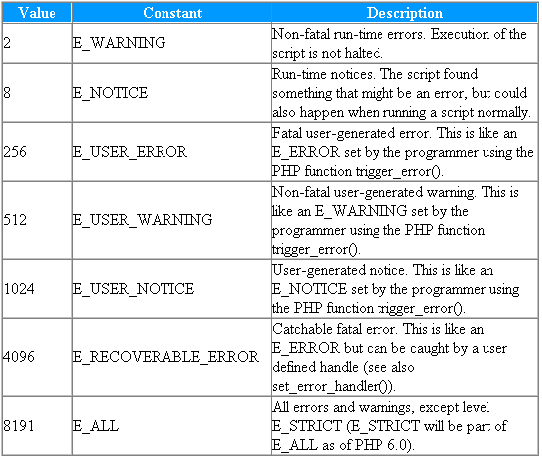
(click image to view)
Let we try to create a function to handle errors:
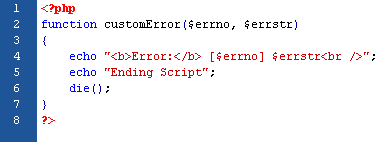
(click image to view)
When the function above is triggered, it gets the error level and an error message. It then outputs the error level and message, and then it will terminates the script.
Set Error Handler

(click image to view)
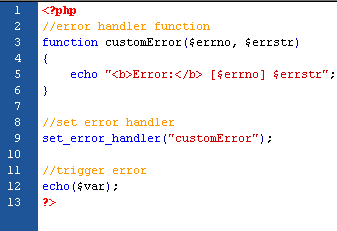
Now, let we try testing the error handler by trying to output variable that does not exist:
(click image to view)
############################################################
The Output:
Error: [8] Undefined variable: var
############################################################
Trigger an Error
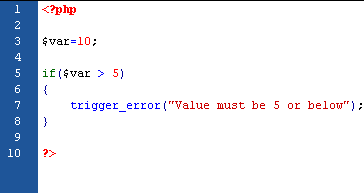
You can trigger an error when users input the illegal data. In PHP, we will use the trigger_error() function:
(click image to view)
And the output should be something like this:
############################################################
Notice: Value must be 5 or below
in C:\webfolder\index.php on line 7
############################################################
There are several possible error types:
- E_USER_ERROR - Fatal user-generated run-time error. Errors that can not be recovered from. Execution of the script is halte.
- E_USER_WARNING - Non-fatal user-generated run-time warning. Execution of the script is not halte.
- E_USER_NOTICE - Default. User-generated run-time notice. The script found something that might be an error, but could also happen when running a script normall.

(click image to view)
And the output should be something like this:
############################################################
Error: [512] Value must be 5 or below
Ending Script
############################################################
Error Logging
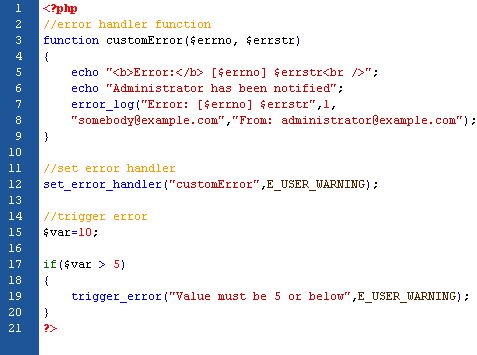
You maybe need to send error log to the servers logging system or remote destination, but it depend on how the error_log configuration is set in the php.ini file. In this case, it is the best way if you try to send the error log to yourself to get notified of specific errors. Lets see the code below for example:
(click image to view)
The output should be something like this:
############################################################
Error: [512] Value must be 5 or below
Administrator has been notified
############################################################
And somebody (in this case: yourself) will received mail from the code above looks like this:
############################################################
Error: [512] Value must be 5 or below
############################################################





 Posts
Posts


