Showing posts with label syntax. Show all posts

Thursday, April 8, 2010

Error Handling

die() Function

The example below shows a simple script that opens a text file:
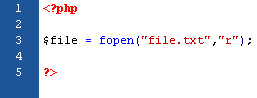

(click image to view)

If the "file.txt" file does not exist, you might get an error like this:


(click image to view)

To avoid that the user gets an error message like the above, we test if the file exist before we try to access it:
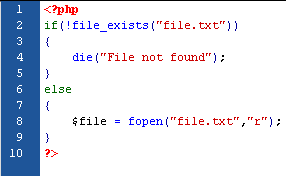

(click image to view)


Custom Error Handler

It is quite simple to create a custom error handler, just by creating a function that can be called when an error occurs, and the function must be able to handle at least 2 parameters (error level & error message). The function also can accept up to 5 parameters. Please look at the description below:

Syntax:


(click image to view)


Error Report Level
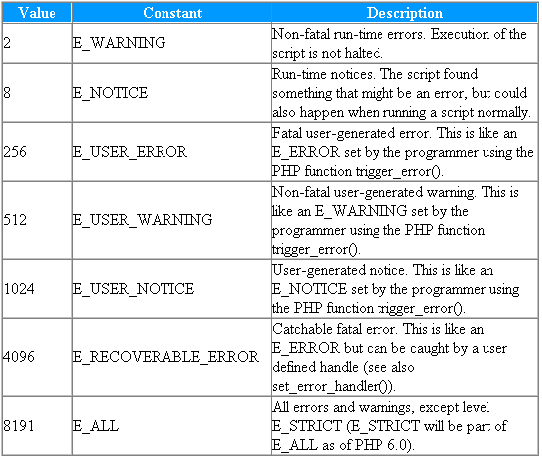

(click image to view)

Let we try to create a function to handle errors:
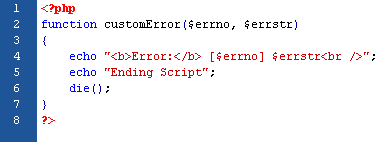

(click image to view)

When the function above is triggered, it gets the error level and an error message. It then outputs the error level and message, and then it will terminates the script.


Set Error Handler


(click image to view)

Now, let we try testing the error handler by trying to output variable that does not exist:
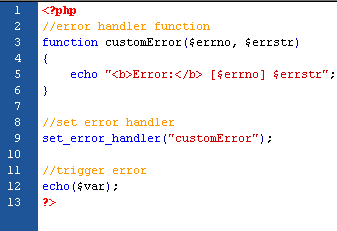

(click image to view)

############################################################
The Output:

Error:
[8] Undefined variable: var
############################################################


Trigger an Error

You can trigger an error when users input the illegal data. In PHP, we will use the trigger_error() function:
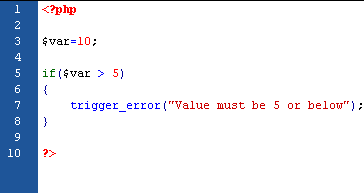

(click image to view)

And the output should be something like this:

############################################################
Notice: Value must be 5 or below
in C:\webfolder\index.php on line 7
############################################################

There are several possible error types:
  • E_USER_ERROR - Fatal user-generated run-time error. Errors that can not be recovered from. Execution of the script is halte.
  • E_USER_WARNING - Non-fatal user-generated run-time warning. Execution of the script is not halte.
  • E_USER_NOTICE - Default. User-generated run-time notice. The script found something that might be an error, but could also happen when running a script normall.
The example below shows an E_USER_WARNING occurs if the var variable is bigger than 5. If an E_USER_WARNING occurs we will use our custom error handler and end the script:


(click image to view)

And the output should be something like this:

############################################################
Error: [512] Value must be 5 or below
Ending Script
############################################################


Error Logging

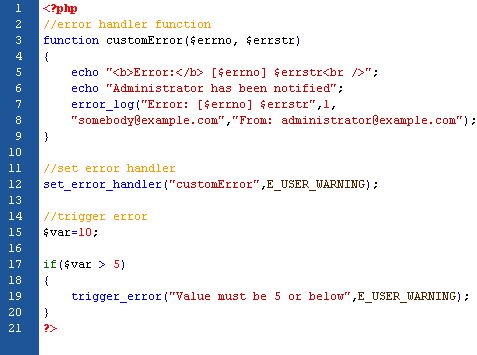
You maybe need to send error log to the servers logging system or remote destination, but it depend on how the error_log configuration is set in the php.ini file. In this case, it is the best way if you try to send the error log to yourself to get notified of specific errors. Lets see the code below for example:

(click image to view)

The output should be something like this:

############################################################
Error: [512] Value must be 5 or below
Administrator has been notified
############################################################

And somebody (in this case: yourself) will received mail from the code above looks like this:

############################################################
Error: [512] Value must be 5 or below
############################################################

Wednesday, April 7, 2010

Cookies

A cookie is a small file that the server embeds on the user's computer and usually used to identify a user.


Create a Cookie

Syntax:


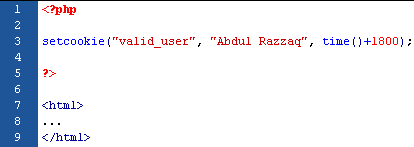
For instance, we create a cookie named "valid_user" and assign a value "Abdul Razzaq" to it. We also specify that the cookie should expire after 30 minutes:


(click image to view)


Retrieve a Cookie Value

You will use $_COOKIE variable to retrieve a cookie value. For instance:


(click image to view)

In the following example we will use isset() function to find out if a cookie has been set:


(click image to view)


Delete a Cookie


(click image to view)


Browser Does Not Support Cookies?

There is one method to solve this problem. All you need to do is to pass the data through forms (previously described in this tutorial. Click here)

Monday, April 5, 2010

date() Function

In the previous tutorial, you have learned the basic knowledge about PHP. I guess you all have mastered the previous tutorial so we can easily move on to the advanced tutorial. In the next tutorial, you will learn more details about PHP functions to make your system more compatible, reliable, and more interested. So, here we go!

date() Function

Syntax:


Here is the description:
  • format - specifies the format of the timestamp (required).
  • timestamp - specifies a timestamp. Default is the current date and time (optional).


Format the Date

Here are some description about the character we will used:
  • d - represents the day of the month (01-31).
  • m - represents a month (01-12).
  • Y - represents a year (in 4 digits).
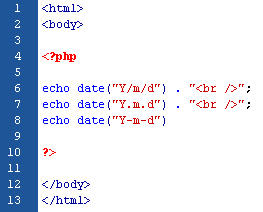
You can also insert the characters like "/", "." or "-" between the letters to add additional formatting:


(click image to view)

############################################################
The Output:

2010/04/05
2010.04.05
2010-04-05
############################################################


Adding a Timestamp

The mktime() function return the Unix timestamp for a date. The Unix timestamp contains the number of seconds between the Unix epoch (January 1 1970 00:00:00 GMT) and the time specified.

Here is the syntax for mktime():


Lets see the example shows below:


(click image to view)

############################################################
The Output:

Yesterday was 04-04-2010
############################################################

Sunday, April 4, 2010

Functions

Create a PHP Function

Syntax:


(click image to view)

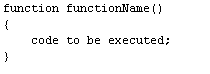
If you want to give a name to the function, you must give a name that reflects what function does. It can be start with a letter / underscore (and NOT a number). See the example below:


(click image to view)

############################################################
The Output:

My name is Abdul Razzaq
############################################################


Adding Parameters into Functions

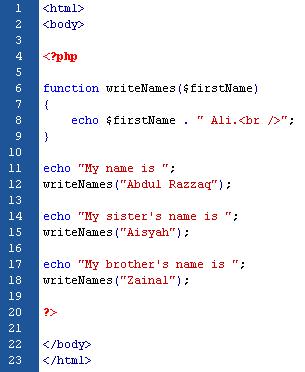
The example below will write different first name, but equal last name:


(click image to view)

############################################################

The Output:

My name is Abdul Razzaq Ali.
My sister's name is Aisyah Ali.
My brother's name is Zainal Ali.
############################################################


Return a Value


(click image to view)

############################################################
The Output:

5 x 6 = 30
############################################################

For Loops

The for Loop

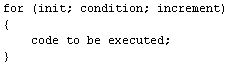
Syntax:


(click image to view)

Description of parameters:
  • init - used to set a counter.
  • condition - evaluated for each loop iteration. If it evaluate to true, the loops will continue. Otherwise, the loops will end.
  • increment - used to increment the counter.
The example below shows a loop that starts with x=1. The loop will continue to run as long as x is less than, or equal to 3. x will increase by 1 each time the loop runs:


(click image to view)

############################################################
The Output:

The number is 1
The number is 2
The number is 3
############################################################


The foreach Loop

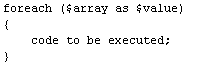
Syntax:


(click image to view)

The example below shows a loop that will print the values of the given array:


(click image to view)

############################################################
The Output:

satu
dua
tiga
############################################################

While Loops

The while Loop

Syntax:


(click image to view)

The example below shows a loop that starts with x=1. The loop will continue to run as long as x is less than, or equal to 3. And x will increase by 1 each time the loop runs:


(click image to view)

############################################################
The Ouput:

The number is 1
The number is 2
The number is 3
############################################################


The do..while Loop

Syntax:


(click image to view)

The example below shows a loop that starts with x=1. It will increment x with 1, and write the output. Then the condition is checked. If condition is true, then the loop will continue to run as long as the x is less than, or equal to 3:


(click image to view)

############################################################
The Ouput:

The number is 2
The number is 3
The number is 4
############################################################

Saturday, April 3, 2010

Switch

Switch Statement

Syntax:


(click image to view)

The syntax above shows a blocks of code to be executed, if the condition is true. But how it works? I'm telling you, first, we have a n expression that is evaluated once. Then, its value will compared with the values for each case in the structure. If there is a match, the block of code associated with that case is executed. We will use break to prevent the code from running into the next case automatically. If no match found, the default will be used. For instance:


(click image to view)

Syntax


Basic PHP Syntax


The scripting block can be placed anywhere in the document. The PHP file normally contains HTML tags. Each code line in PHP must end with a semicolon ";". For instances:


(click image to view)

*Note: The file you created must have a .php extension at the end of the file name.


Comments in PHP


(click image to view)